Payroll · the 28th
Payroll day, without the Excel file only one person understands.
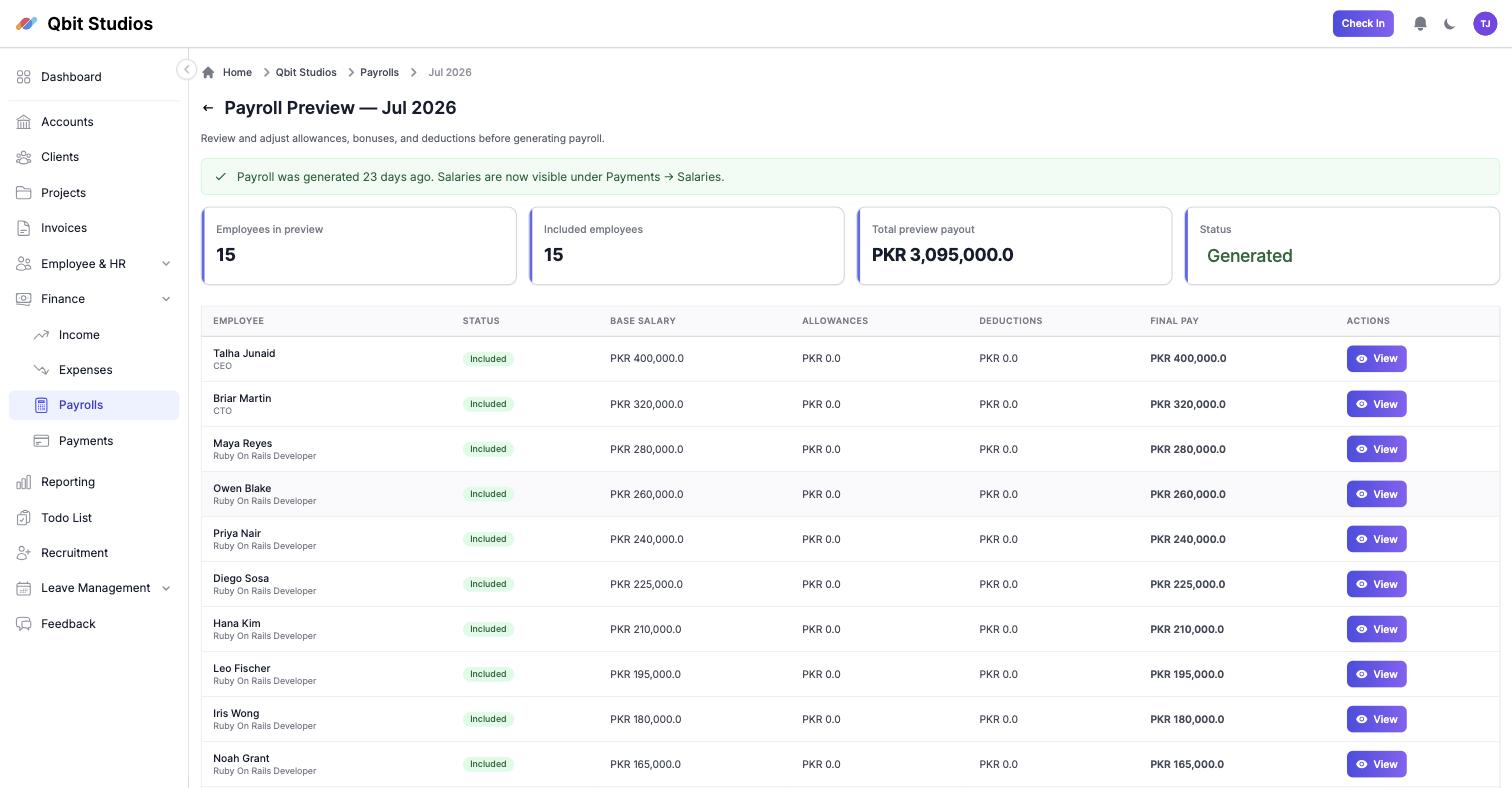
Pick the month, preview every salary — allowances, deductions, provident fund, all in PKR — and generate the whole run in one click. Payslips, salary payments and your books update together.
14 days free · No card needed · We'll do the first run with you on a call
You know this spreadsheet. So do we.
One wrong row
A copy-paste slip and somebody's rent is late. You don't find out from the spreadsheet — you find out from them, on the 29th.
The monthly ritual
Half a day rebuilding the same sheet: who joined, who left, whose allowance changed, who took unpaid leave. Every single month.
December's argument
Leave balances live in memory until they collide with final-pay calculations. Then everyone remembers differently.
How a run works
Three steps, and the third one is a button.
This is the app's own flow, not a marketing diagram.
-
1
Pick the month
Startup-pal suggests the next unpaid month. Everyone with a salary profile is pre-loaded into the preview.
-
2
Preview and adjust
Every employee's base, allowances and deductions, editable per person. Toggle anyone out of this run, override a figure, leave a note — changes affect this month only.
-
3
Generate
One click creates the salary payments, stores the payslips, surfaces everything under Payments, and updates your financial stats. Done by the 28th, boringly.
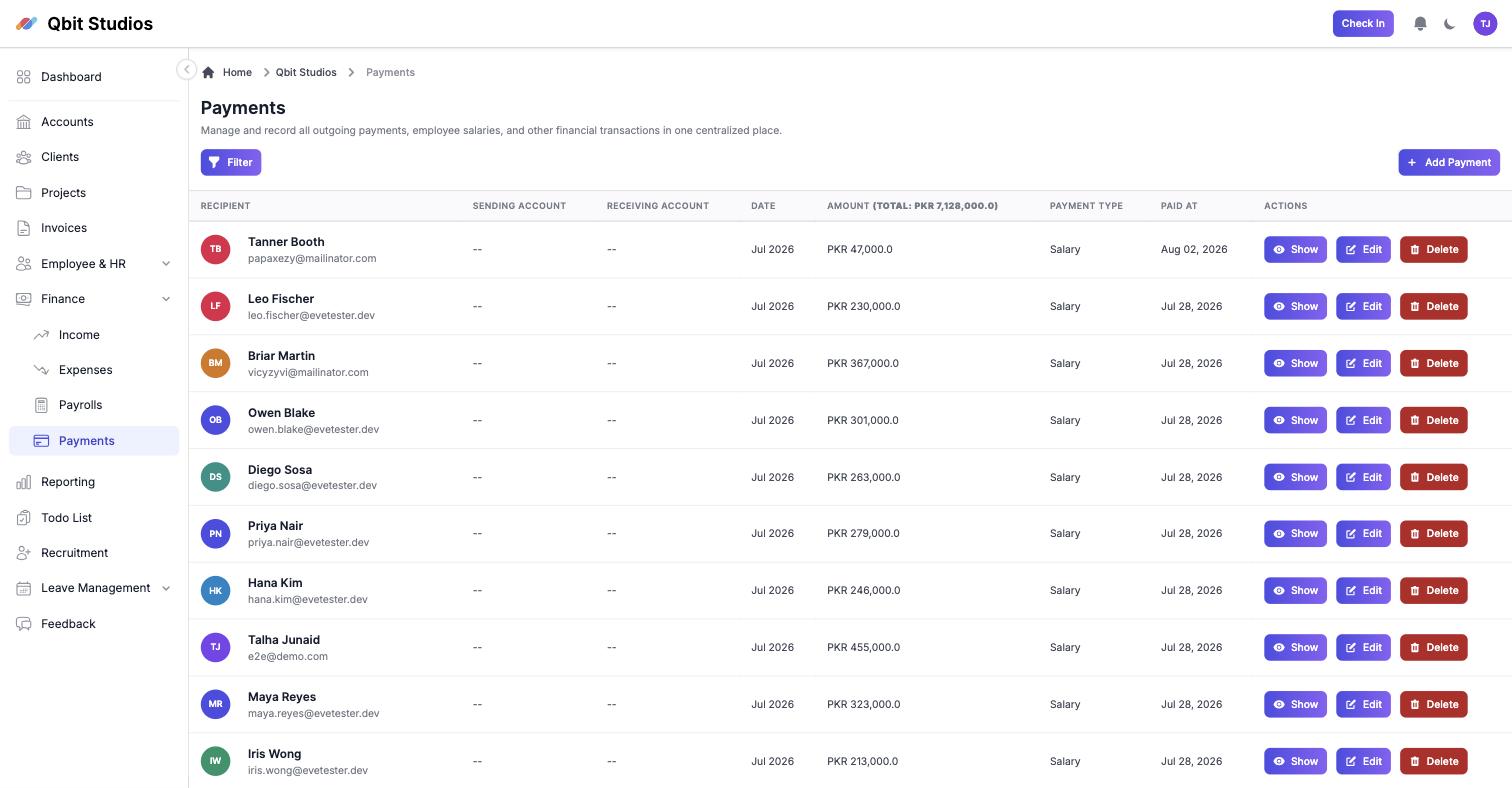
After generating: every salary lands as a payment record, dated and tied to the employee.
Built for how Pakistani companies actually pay people
Foreign tools stop at the Kanban board. This is the part they don't build.
PKR, everywhere
No currency conversion, no dollar pricing underneath. Salaries in rupees because they are paid in rupees.
Allowances & deductions
House rent, transport, fuel — per employee, with one-month overrides when something changes.
Provident fund
Tracked per employee on the salary profile and carried through every run.
Leave-aware pay
Approved leaves and attendance feed the calculation instead of being reconciled by memory.
Payslips in one click
The whole team's slips generated together — not fifteen Word documents, one at a time.
Salary increments
Raises recorded with an effective date, so the runs before and after both stay right.
Payments recorded
Each salary lands in the Payments module against the employee, dated and auditable.
Books stay current
Every run updates company financial stats the moment it generates — profit includes payroll instantly.
Frequently asked questions
Our allowances are unusual. Will they fit?
Allowances and deductions are defined per employee and editable inside every run, including one-month overrides. If your structure genuinely doesn't fit, tell us on WhatsApp and we'll say so honestly.
What about employees who joined mid-month?
Each payroll item carries the days employed in the period, so a 12-day joiner doesn't get a 31-day salary.
Can I exclude someone from a run?
Yes — toggle them out of this month's preview with a reason. They stay in the system and return next month.
Where does salary data live, and who can see it?
In your company's own isolated tenant, visible only to the roles you allow. Nightly backups, and you can export everything you've entered at any time.
We've been doing this in Excel for years. How do we start?
Enter your team's salary profiles once — or send us your sheet and we'll help. Then we'll sit with you on a call and do the first run together.
Still unsure? Message us on WhatsApp — we usually reply within the hour, 9–6 PKT.
Make the 28th boring.
Fourteen days, the whole product, no card. If it hasn't saved you a day by the end of it, walk away.